
Users (general) | Data | Companies | Departments | Log
The ‘Log’ tab displays all activities related to the selected user. The same entries can also be seen in the general log (System > Log), but here they are already filtered by user.
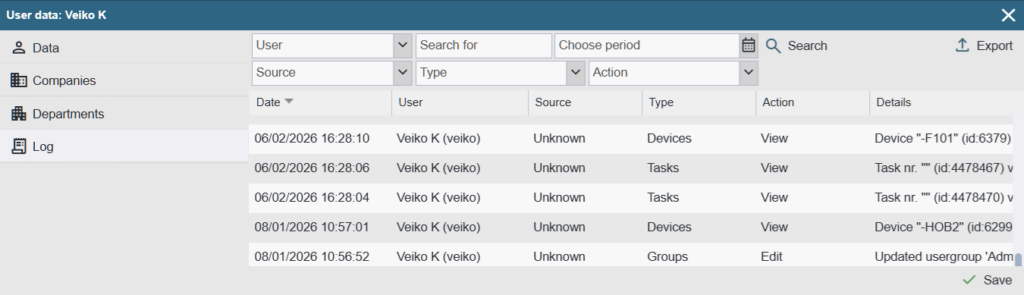
Filters:
- Source: Allows you to filter entries by their origin (mobile version, desktop version, API, etc.).
- Type: allows you to filter activities related to specific parts. For example, activities related to equipment, spare parts or work orders.
- Action: allows you to find records related to a specific activity. For example, add, delete, modify, etc.
- Text search: allows you to search for a phrase in the ‘More info’ column of the log entry.
- Choose period (date filter): Allows you to filter entries from, until, or within a selected date range.
There is an ‘Export’ button in the top right corner of the table which allows you to export the filtered view to an Excel spreadsheet if you wish.
Table view:
The log table contains the following columns:
- Date: The date and time when the log entry was created, with accuracy to the second.
- User: The creator of the entry. If the user name is missing, the entry was created/registered by the system (an unauthenticated user).
- Source: The origin from which the entry was generated.
- API: The entry was created through the API interface (integration).
- Mobile: The entry was created through the Alldevice mobile interface.
- System: A log entry generated by the Alldevice application.
- Desktop version: The entry was created through the Alldevice desktop (web) application.
- Ext URL – The entry was created through the Alldevice application’s external interface (for example, adding a work order via an external link)
- Unknown: Entries with unidentified origin (entries created before version 1.6.48).
- Type: The type of entry, indicating which module or function it is related to.
- Action: The action that triggered the entry (for example adding, modifying, deleting, etc.).
- Details: A more detailed explanation of the log entry. PS! The description of the log entries (additional information) is always in English and is not translated.