
Improvements
- “[#3] Added the option to receive an email notification when a work order created by me is closed (requires the privilege ‘Receiving notifications when tasks created by the user are closed’).
- [#313] A new permission ‘Work time management (add, edit, delete)’ has been added to the “Tasks” tab in user privileges. If the user does not have this permission, they cannot change the start or end time of work when confirming a work order. They also cannot make changes on the Work Times tab of the work order.
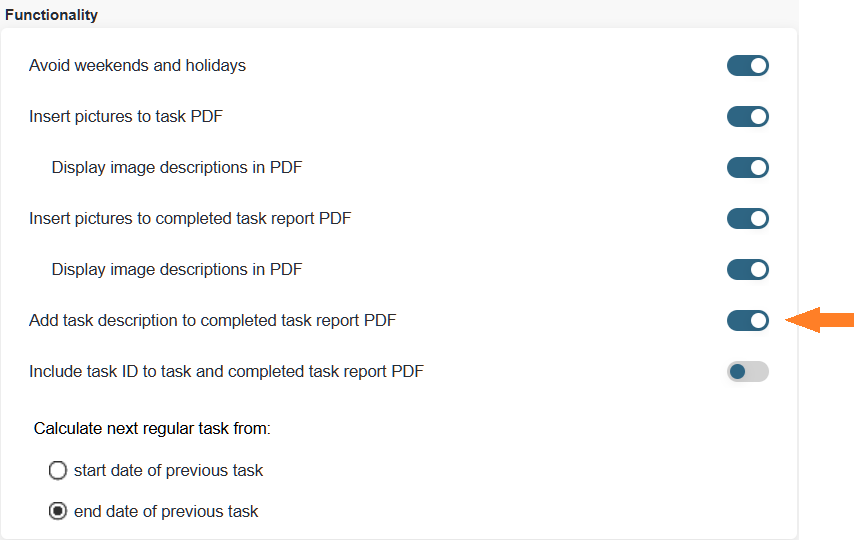
Note: After the update, no changes will be made to existing user permissions (this privilege will be enabled by default for users who are allowed to confirm tasks). - [#452] Added the option to display the task description also on the completed task report. To activate this feature, see Settings > Settings > General settings.
- [#648] Two new columns have been added to the ‘Reports > Work Hours’ table: ‘Planned man‑hours’ and ‘Actual man‑hours’.
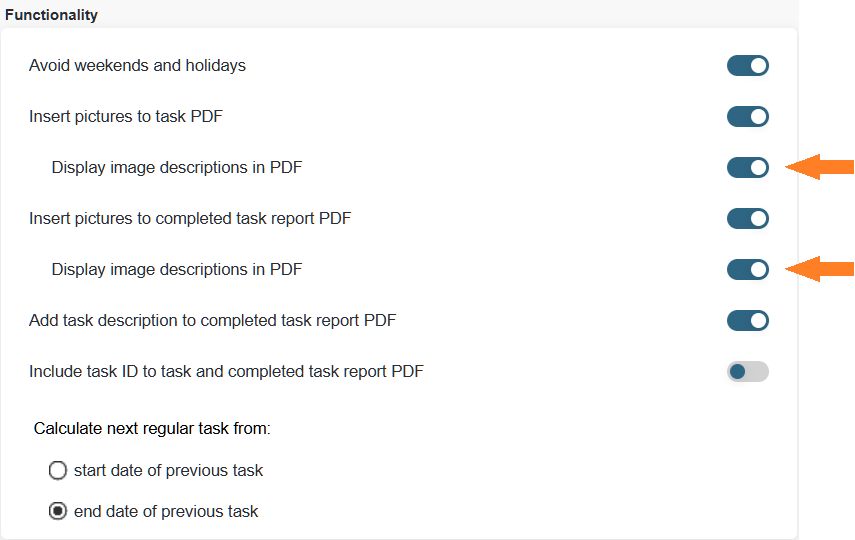
- [#657] Added the option to display the file description (file name) next to images shown on the work order and/or the completed task report. To activate this feature, see Settings > Settings > General settings.
- [#736] New permissions have been added to the View group under the “Locations and Devices“ tab in user privileges, allowing control over the availability of each tab on the device card. Note: After the update, users will not see any changes in their view (the new privileges are enabled by default for existing user groups).
- [#710] Update to the content of the ‘Unfinished task report’ notification and its PDF attachment.
- [#840] A new column, ‘Device status’, has been added to the column selection in the ‘Reports > Tasks’ table. The column displays the current status of the associated device. Enabling the column also makes filtering by this field possible. By default, the column is hidden. You can read how to show or hide columns HERE.
- [#998] Added duplicate‑entry validation to Settings > Tasks > Stages, as well as a check preventing deletion of a stage that is used in an active work order. Log entries have also been added for adding, editing, and deleting stages.
- [#1080] Added the ability to select and remove multiple spare‑part rows on the device card spare parts page (supports Ctrl and Shift for multi‑selection or range selection).
- [#1104] Added the week number to both the weekly and monthly calendar views.
- “[#1121] Added a new dynamic preset to the date filter: ‘Last 365 days’.
- [#1124] If the user’s visibility is restricted to a specific department, tasks outside that department are shown in the daily, weekly, and monthly calendar views as a ‘Busy’ block, along with the related task number.
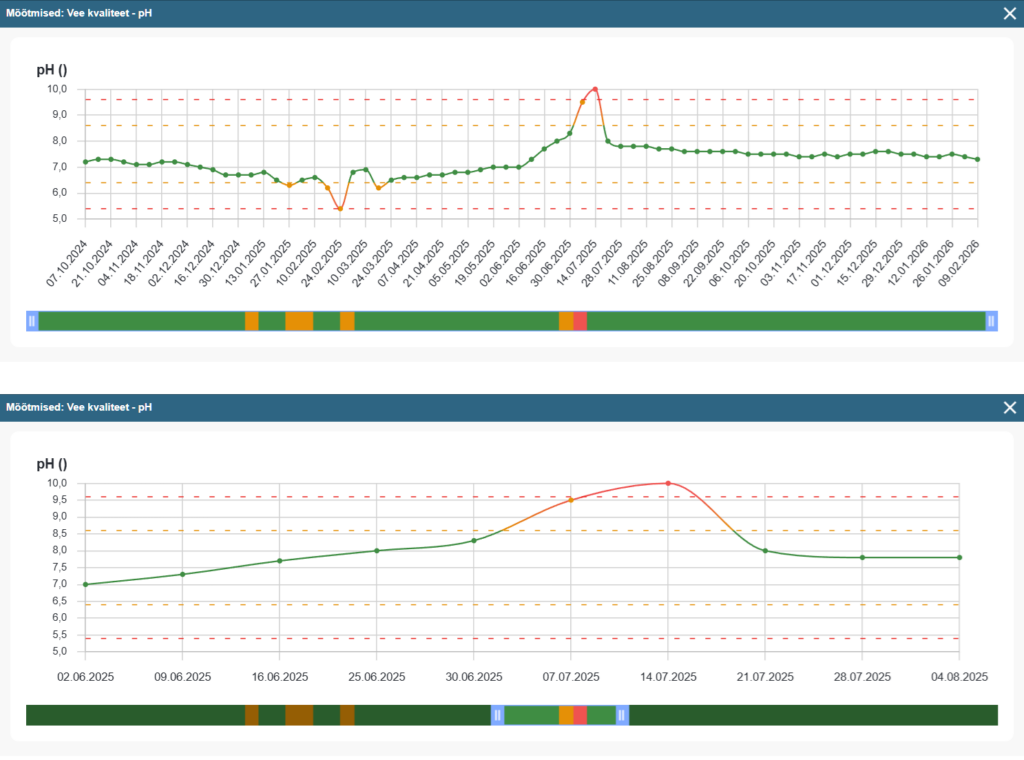
- [#1138] Improvements to the functionality and visuals of the chart opened from the device card’s Measurements page. It is now also possible to zoom into a selected area of the chart (zooming becomes available starting from 20 measurement points).
- [#1141] A new Log tab has been added to the device card, spare part card, task card, and user card. The Log tab displays all entries related to the specific item (mirroring the system log entries associated with the card).
- [#1141] A new column “Source” has been added to the system log, displaying the origin of each log entry (Unknown, API, Mobile, System, Web version, External URL). The source of a log entry will be recorded starting from this update. Older entries will show Unknown as their source.
- [#1145] The layout of the tabs on the user card has been changed to a vertical format.
- [#1146] The permission for managing downtime settings has been moved under a separate privilege (existing privileges remain intact after the update).
- [#1156] A new status filter option “Started” has been added to the task tables, allowing you to filter all tasks where at least one work time entry is missing an end time.
- [#1163] The response of the
/api/tasks/work_timesAPI request has been extended. The response now includes the type of work‑time registration (opening/closing): manual — the work time was entered manually; realtime — the work time was recorded in real time; nfc — the work time was recorded in real time via NFC tag scanning. - [#1167] Added the option to request a confirmation email when a task submitted via an external link is successfully created. If the external link requires login, the user submitting the task must have the corresponding privilege (‘Send an e‑mail notification to the user when an external task is successfully created by him’). In no‑login mode, the option can be selected when specifying the name (to change the selection in anonymous mode, click the name field in the external task submission window).
- [#989, #1061, #1105, #1059, #1111, #1128, #1149, #1162] Minor usability improvements and enhancements.
Bug fixes
- [#510] If an custom field was accidentally marked as global and the global status was later removed, previously assigned links to device categories disappeared (ACS‑248) — Fixed.
- [#583] When selecting performers and moving the mouse to the next row without releasing the left mouse button, all selected performers were cleared (ACS‑285) — Fixed.
- [#1164] In Settings > Measurements > Measurements, sorting by the number of measuring points in the table did not work — fixed.
- [#985, #1028, #1041, #1059, #1139, #1140, #1144, #1155, #1158] Minor bug fixes.