
In Alldevice, task (work order) numbering starts from one for each new client.
Each work order number consists of a static prefix, a dynamic (incremental) number, and a static suffix
The task number combination—including its prefix and suffix—is unique and cannot be duplicated.
The task prefix or suffix can be configured in the settings window under “Settings > Settings > Functionality Work Order Numbering.”
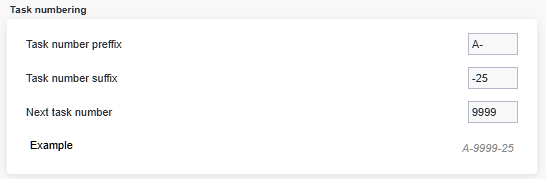
If you want a space or another symbol (e.g., a hyphen) between the prefix and the number, you must include it when entering the prefix. The same applies to the suffix
Can I restart task numbering from one at the beginning of each year?
Yes. To do this, you must use either a prefix or a suffix in the task number.
For example, you can add the year before the number (as a prefix) or after the number (as a suffix).
Can I start work order numbering from any arbitrary number?
Yes. When you start using Alldevice, you don’t have to begin numbering from one.
If your work orders were already numbered before adopting Alldevice and you want to avoid overlaps with the numbering used in your previous system, you can define the desired starting number in the settings (see image above).
What happens if I save the next task number as “1” at the beginning of the new year without changing the prefix or suffix?
In that case, you will receive an error message indicating that the number is not allowed.
The message will also display the minimum work order number permitted with the current prefix and suffix combination.

Does changing the prefix or suffix also update existing task numbers?
No. Existing task numbers will not be changed.
For example: If I confirm a task today with a one-year interval, the next work order will be created for the following year and will receive a number based on the rules currently in effect.