
Improvements
- [#90] “Units left” and “Counter AVG” have been added to the column selection on the Home page and in the Tasks table. “Units Left” displays the remaining counter units until the next maintenance. “Counter AVG” shows the device’s average daily counter increase over the selected period (the period length can be adjusted in the settings; by default it is 14 days).
- [#559] Added the option to create a new work order based on an existing one. Available from the context menu via “Copy task”
- [#676] When a user is deleted, they are removed from all open tasks and task sheet templates (previously, the deleted user’s ID could still be seen there).
- [#757] The visual presentation of information on the Task details page has been adjusted.
- [#758] Updated date filter logic and interface across most tables. Replaced separate From and To date fields with a single field. The new field allows manual input of start, end, or range values, or selection from predefined preset
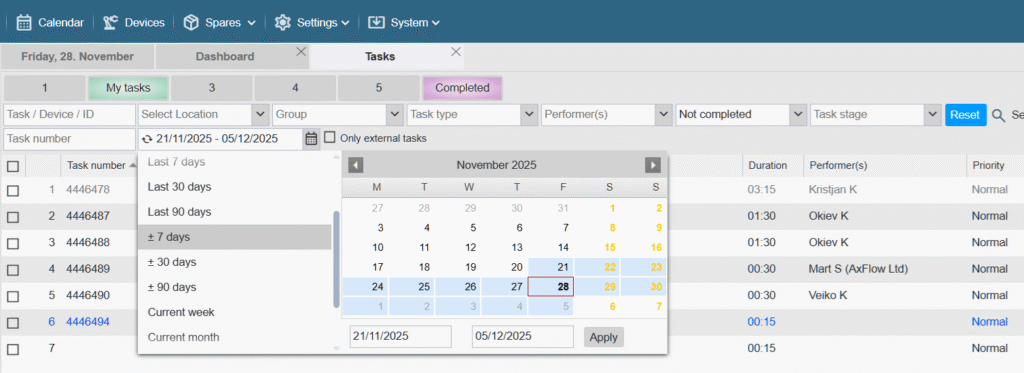
Most preset date filter options are now dynamic. Example: if you select ±7 days and save it to memory, it will remain ±7 days the next day (not shift to –8 / +6). An icon in front of the date field indicates whether the filter is static (lock) or dynamic (refresh) - [#768] A prompt to enter the current password has been added to the user profile window when attempting to change the password, in order to prevent unauthorized password changes. The current password is also requested in the Settings > Users > Users > /my user/ window (the current password is not required when changing other users’ passwords).
- [#771, #848] Changes to a device’s location and name are now stored in a separate table. A new “Movement History” tab has been added to the device card, and a new “Device Movement History” table is available under Reports.
To view these new elements, the corresponding privileges must be enabled under Settings > Users > Groups > /selected group/ …
[ Locations and Devices ] [ View ] [ x ] Movement History
[ Reports ] [ View ] [ x ] Device Movement History
The device movement history is displayed starting from the moment this update is applied and does not include any historical data. - [#783] Added a new tab “Task pictures” to the device card. This tab displays all images attached to work orders, with the option to switch between list view and grid view.
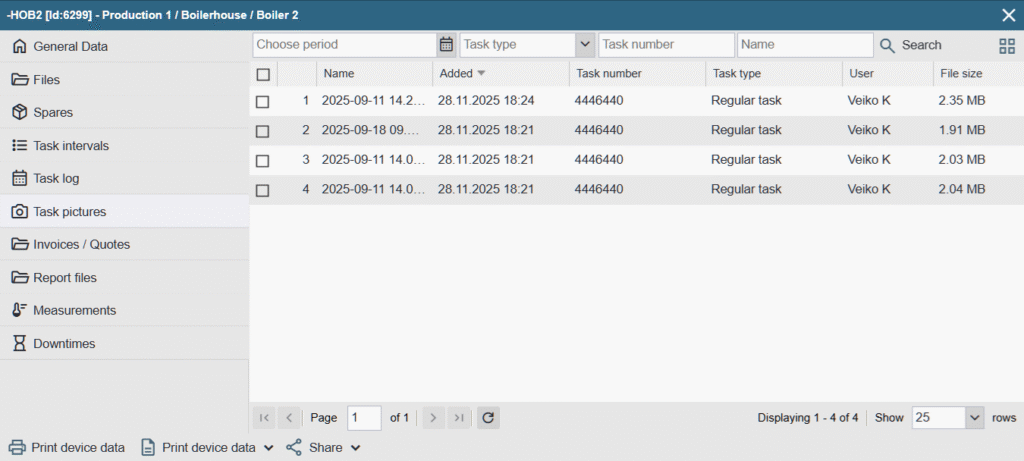
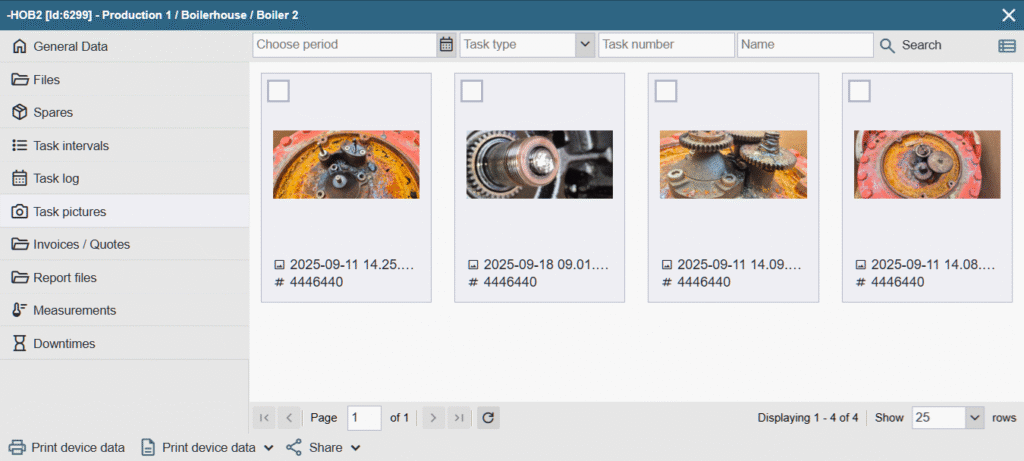
- [#797] An option to rename the filter memory button has been added (right-click: ‘Rename’).
- [#798] Memory buttons for filters have been added to the tables in Spare Parts, Devices, Reminders, Reports > Tasks, and Completed Task Reports.
- [#799] A multi-select option has been added to the task type filter in the Reports > Completed Task Reports table.
- [#855] The tooltip that appears when hovering over items in the “Bubble Calendar” device and performer views has been updated to improve readability.
- [#858] The calculation of the “Relative overdue” column value has been improved. The column has been made sortable (A > Z).
- [#862] Added a new “Phone” custom field type to the device card. In the mobile version, a phone icon is displayed next to the number. Tapping the icon allows you to directly call the selected number
- [#867] Columns related to the cost and sales price of spare parts and additional expenses have been added to the column selection in the Reports > Completed Task Reports table.
- [#886] The spare part manufacturer has been added to the list of available columns in the table on the used spare parts page of the task card.
- [#898, #950] Improved loading speed for calendars and tables
- [#919] The currency unit selection has been moved from Settings > Companies > /company name/ to the general settings (Settings > Settings > Time Zone and Calendar). The previously free‑text currency field has been replaced with a selectable list. After the update, the correct currency unit is automatically selected.
- [#921, #945] Enhancements to API requests
- The tasks/list query response now includes the interval ID –
"interval_id": 123 - The products/update query now supports updating the VAT percentage value. –
"vat_percent": 24
- The tasks/list query response now includes the interval ID –
- [#930] Opening a completed work order for editing and saving is now recorded in the system log
- [#931] A filter has been added to the Icons column (in both the desktop and mobile versions), allowing users to search by icons. New icons have been added to the column: images attached to the work order, and spare parts linked to the work order.
- [#934] A sorting option has been added to the Used Spare Parts page on the task, allowing items to be ordered by the “Selected Spare Parts” column (useful for bringing marked spare parts to the top when working with very long lists).
- [#940] When adding a new interval schedule row on the device card, the field rules are automatically copied from the previous row
- [#948] A new option, “Completed & Signed”, has been added to the status filter in the work order lists on both the desktop and mobile versions (indicating that the related report has been signed by the customer).
- [#951] A notification has been added to alert users when the network connection is missing or interrupted.

- [#984] The display logic for selected spare parts in the mobile version’s “Used Spares” view has been improved so that selected items are always shown at the top.
- [#1010] The visibility of the comment carried over from the previous regular work order has been improved, making it more noticeable.
Bug Fixes
- In Reports > Spare parts > Spare part history and Device/Location‑based history tables, the location filter did not work and always returned an empty page – Fixed
- [#644] On the Repairs Report page, when faults span multiple pages, the red/green status colors were displayed incorrectly on the second page — Fixed.
- [#920] When reopening a closed task (cancelling confirmation), the entered counter reading was being updated with the current counter value. It should retain the originally entered value (ACS-382) — Fixed.
- [#922] When adding a spare part write-off, the stock was previously left unselected by default. Since there is only one stock, it should always be selected automatically — Fixed.
- [#925] If the device linked to the task had no category assigned, it appeared as though a fault type could be selected, but the selection did not work and caused confusion — Fixed
- [#927] Assigning a group and fault type on a task requires device‑editing permissions, which is not logical — Fixed (the unnecessary permission check has been removed).
- [#931] In certain cases, the icons for counter‑based tasks were not displayed correctly — Fixed.
- [#933] If a user did not have permission to manage a task, they were still able to modify work times — Fixed.
- [#939] When adding a .mov file to a work order, a question‑mark icon was displayed — a new icon has now been added.
- [#946] When entering a comment while completing a work order, the comment was lost if it was not saved before adding work time or an intermediate step (ACS‑396) — a save warning has been added.
- [#952] In the spare part write‑off window, searching by code did not work – Fixed
- [#957] When I add a work order via the tasks/create API, I receive a response with certain worker
"message": "user_id '194' is not available for this service task". – Clarified the error description returned in the query response. Example:"user_id '194' is not available for this service task (Verify if user is a performer)" - [#958] When I export the list of tasks to Excel, the duration column is in text format and I cannot sum them up (ACS-399). – Fixed
- [#959] The calendar displayed tasks that were linked to a deleted device – fixed
- [#976] The
tasks/completeAPI request cleared the existing comment and duration if they were not included in the payload — Fixed - [#979] In the mobile version’s spare parts table, the stock filter displayed deleted stock (ACS‑403) — Fixed.
- [#980] After deleting a stock that a user was linked to, the user could no longer be assigned to another stock (ACS‑403) — Fixed.
- [#1002] When right‑clicking the time column in the weekly calendar and selecting “Add Task”, the application crashed — Fixed.
- [#1018] In the warehouse movements table, sorting did not work for some columns (most were fine) — Fixed.
- [#1003] The barcode was no longer printed on the spare part card PDF — Fixed.
Bug Fixes (1.6.45)
- When I change the task confirmation end time, the current time is still taken instead of the one I selected. – Fixed
- When I want to move to the next month in the calendar, it jumps to the month after next (ACS-414). – Fixed
- The task subject field is no longer displayed on the completed task report (ACS-415). – Fixed
- When I add a new task, it no longer gets sent by email (ACS-418). – Fixed