
Improvements 1.6.49
- [#720] Added an option to the multi‑factor authentication (MFA) feature to define how many days after the previous login the code should be requested again. The value can range from 0 to 30.

Settings > Settings > Functionality | General
Note: If you do not see the MFA option in the functionality settings but would like to enable it, please send us a message to sales@alldevice.com - [#810] Added the is_external parameter to the task list API response. If a task is created via an external link (Ext URL), the response will include
is_external: true. - [#826] Added the ability to import related spare parts from another device to the device card’s spare parts tab.
- [#905] Added a new privilege to the ‘Tasks’ user group: ‘Show item IDs on the task card’. When this privilege is enabled, the task ID and the related device ID are displayed on the task’s general information page.
- [#906] Added the option to export the user list in Settings > Users > Users table.
- [#929] Added ‘Fault type’ to the column selection in Reports > Completed Task Reports table. The column is hidden by default. You can read how to show or hide columns HERE.
- [#966] Added log entries (create, update, delete) for the following entities: Device manufacturers, Companies, Department list, External link.
- [#1173] Improving the loading speed of the Devices table in both the user interface and the API.
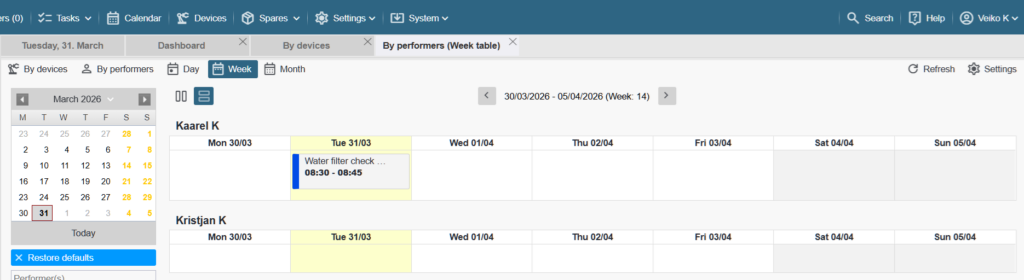
- [#1183] Added a horizontal view to the calendar’s week view. You can switch between the vertical and horizontal layouts using the buttons on the left side of the calendar header.
- [#1192] Removed sending work orders in HTML format via email. The work order is now always attached as a PDF file. The email body includes statistics about the file in the attachment.
- [#444, #1082, #1181, #1182, #1184, #1190, #1200, #1202, #1203] Minor usability improvements and enhancements.
Improvements 1.6.50
- [#1221] Settings > Settings > Email settings > General settings – Added an option to enable including work order data in the email body. Applies only when sending out a single work order (ACS‑476).
- [#1126] Added the option “No stage assigned” to the task stage filter in the task tables.
Bug fixes 1.6.49
- [#967] Fixed an issue where sorting by special characters (such as Õ, Ä, Ö, Ü) did not work correctly in some tables.
- [#1174] Fixed an issue where generating a QR code from the device card did not work in the Firefox web browser.
- [#1176] Fixed an issue where the right-side information block in the document footer was centered when the middle block contained no information.
- [#1176] Fixed an issue where the user card was too narrow vertically on first opening after the latest update.
- [#1186] When the privilege ‘Downtime Settings Management’ is missing, the option ‘… Add new’ is still visible in the downtime category selection – Fixed.
- [#1187] The task creation API endpoint allowed submitting any number as the creator ID (added by), which caused errors when confirming the task — Fixed.
- [#1193] The date selection shortcut for ± 7, 30, 90 days applied only the + days in the filter — Fixed.
- [#1196] In some cases, blank pages appeared between images in the work order or completed work report — Fixed.
- [#1198] After the latest update, the device tree collapsed when adding a new task — Fixed.
- [#967, #1175, #1185, #1195, #1197, #1199, #1201, #1206, #1211] Minor bug fixes.
Bug fixes 1.6.50
- [#1219] Fixed an issue where the XLS export of the work order table converted duration into the hh:mm format, which removed part of the hours when the duration exceeded 24 hours. The format has been corrected to [h]:mm.
- [#1220] Fixed an issue where the content of the Completed Task Report PDF could overlap with the footer.
- [#1223] Fixed an issue where the cost of used spare parts did not match between Reports > Tasks and the Dashboard.
- [#1225] Fixed an issue where work orders created via an external link did not generate a list of associated spare parts.
- [#1212, #1223] Minor bug fixes.