
Improvements
- [#878] The most frequently used performance indicators (KPIs) in maintenance have been added to the dashboard. Indicator values become visible on the day following the update and refresh once every 24 hours.
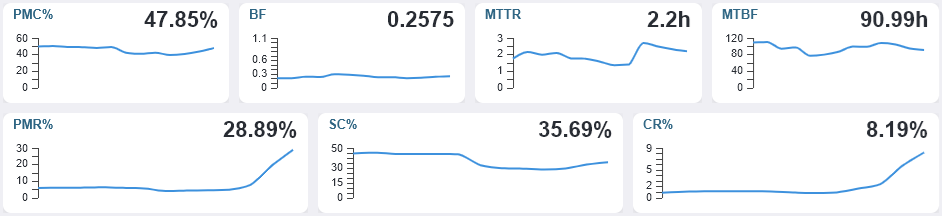
Read more about the indicators here: https://wiki.alldevice.com/d/reports-dashboard
- [#713] Reports > Tasks – Added “Task Description” to the column selection. The column is also included in the XLS export when it is visible.
- [#778] Added the ability to search by an device custom field in the “Tasks” table. The search option becomes visible when at least one custom‑field column is displayed. The search operates only on the custom‑field columns that are currently visible.
- [#795] Added the columns “Sales Price (0% VAT)”, “VAT Total”, and “Sales Price (+VAT)” to the following tables: “Tasks”, “Reports > Tasks”, “Reports > Completed Task Reports”, and Device Card > Log”. These columns are available only when the setting for displaying the sales price on the spare‑part card is enabled.
- [#1031] In the Spare Parts table, the checkbox filters “Only items in stock” and “Below minimum quantity” have been converted into dropdown‑select filters

The buttons previously located on the right side of the Spare Parts table — “Stock Movements”, “Import”, and “Export” — have been moved under the additional‑options menu button.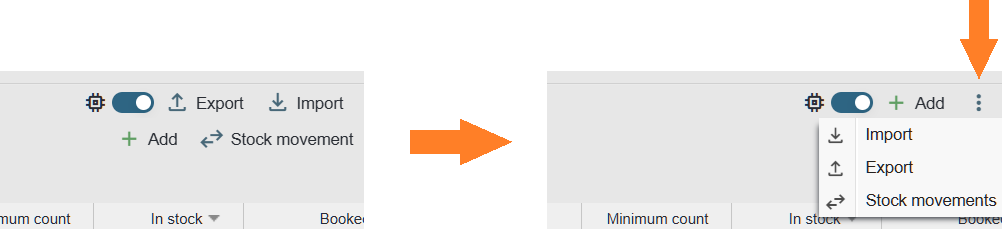
- [#1066] Unified the information layout in the Task and Completed Task Report PDFs and updated the layout to accommodate the newly added custom‑field types
- [#1081] Improvements to API response data. The responses of the
/api/tasks/listand/api/taskreports/listendpoints now include the counter reading entered on the task. - [#719, #963, #1067, #1072, #1077, #1105] Minor adjustments and improvements
Bug fixes
- [#938] The search settings in the device tree were not functioning as expected. When the search was configured to use only the ID, results were still found based on the name. – Fixed
- [#971] The date format used in the System Log export did not match the date format shown in the user interface. – Fixed
- [#999] When adding task stages, the date field used a two‑digit year format. It should use a four‑digit format, consistent with the rest of the system. – Fixed
- [#1000] When multiple spare‑part cards are opened and moved to different positions on the screen, saving changes caused the card to jump back to its original location. – Fixed
- [#1064] When adding a completed task through the Device Tree and the fault‑type selection is set as mandatory, it was not possible to save a planned task because the system required selecting a fault type that does not exist in this workflow. Adding the same entry from the top menu worked correctly. – Fixed
- [#1067] On the Device Card’s “Task Images” page, it was not possible to select images one by one in grid view by clicking their checkboxes, unlike in list view. Selection worked only when holding the Ctrl key. – Fixed
- [#1073] When confirming reminders from the view at the bottom of the home page, it was not possible to proceed directly to the task confirmation page because the option was missing. Opening the same task from the top tasks view displayed all required options correctly. – Fixed
- [#1074] After the introduction of the new date‑filter window, it was no longer possible to filter stock‑movement records for the current day. – Fixed
- [#1079] When all filter slots are in use in the Tasks view and a work order is opened from there for completion, it was not possible to enter the % character in the work description. The % key was interpreted as a shortcut for selecting the fifth filter slot. – Fixed
- [#1116] When adding a task via an external link, the start time and the duration was set to 00:00. These values should follow the same default start time and duration as when adding a work order through the Alldevice interface. – Fixed
- [#1005, #1011, #1021, #1037, #1119, #1123] Minor bug fixes